New Contributing Circumstances & Multivehicle Filters!
Posted on February 22nd, 2021
This update introduces the new Multivehicle and Contributing Circumstances filters in the Crash Map module! Read below to see how these additions can help with your analysis.
- Multivehicle Filter: query crashes based on the number of vehicles and specify individual vehicle direction.
- Contributing Circumstances Filters: query crashes by contributing circumstances from vehicles or pedestrians.
Multivehicle Filter
The Multivehicle filter allows users to filter crashes based on the number of vehicles and the respective direction of the first and second vehicles. Vehicle 1 (V1) indicates the first vehicle in the crash's sequence of events while Vehicle 2 (V2) indicates the second vehicle in the sequence. Below are the options you can choose from:
- 1 Vehicle: query crashes that involve only one vehicle.
- 1+ Vehicle: query crashes that involve at least one vehicle.
- 2 Vehicle: query crashes that involve only two vehicles.
- 2+ Vehicle: query crashes that involve at least two vehicles.
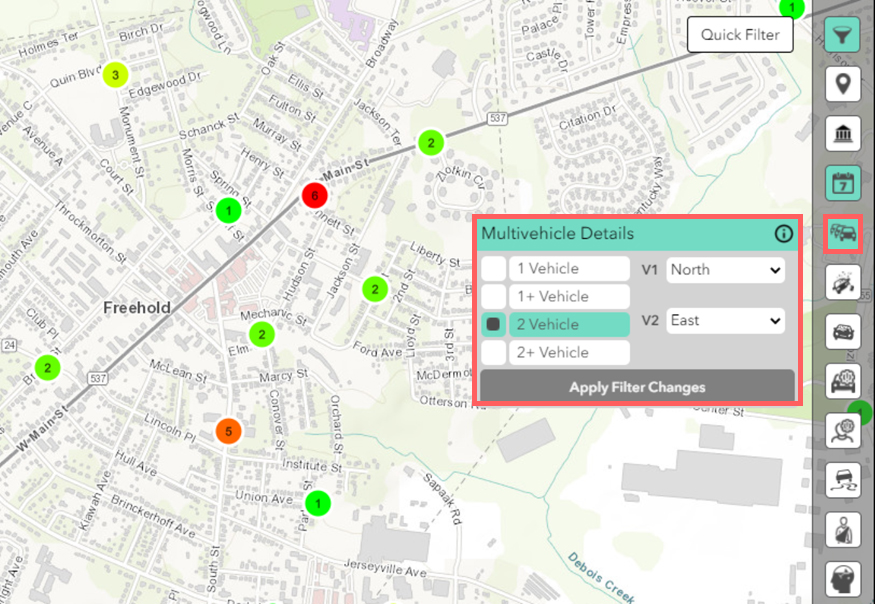 The Multivehicle filter querying for crashes involving two vehicles with V1 and V2 directions specified.
Contributing Circumstances Filters
The Contributing Circumstances filters allow users to query crashes by contributing factors. These factors are seperated into Vehicle Factors and Pedestrian Factors based on Contributing Circumstance categories under the 2017 NJTR-1 form.
Selecting multiple options under the Contributing Circumstances filters will return crashes with the selected options combined with the "OR" clause. In the image below, the crashes returned have one of the following Contributing Circumstances: "Unsafe Speed" OR "Improper Lane Change" OR "Failure to Keep Right".
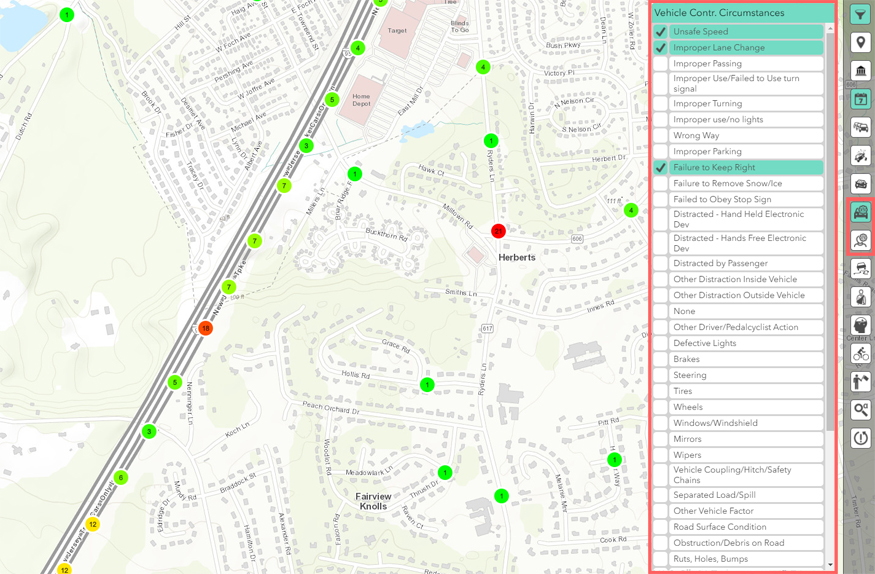 The Vehicle Contributing Circumstances filter querying for crashes within Herberts.